
How to make the Tiny Desk AI video, step by step
Upload one to five photos, check the picture of you behind the desk, watch a free preview of your close-up, then unlock the full 15-second video with the live sound. It runs in the browser on your phone or computer.
By AI Tiny Desk Video · Last updated October 28, 2026
What you need
- One clear photo of you, facing the camera, chest up. Up to four more for friends, or one group photo. JPG, PNG or WEBP, up to 25 MB each.
- A phone or a computer with a browser. Nothing to install.
- About 5 minutes for the free preview, and a credit pack for the full video (see pricing).
Step by step
- Open the generator. The big spot on top is the lead singer: add your photo there.
- Add friends to the keys, the sax and the two backing vocals, or tap Use a group photo. Parts you leave empty are played by our band.
- You see a picture of you grinning behind the desk. If it looks like you, say yes. About 4 minutes later your free preview plays: about 3 seconds of your close-up, with a watermark.
- Like it? Unlock the full video in HD (720p) or Standard (480p). It's made again from the same photos with the band and the sax solo, so details can differ from the preview.
- Download the MP4 with the live sound, or the silent one to add TikTok's own sound, and post.
What you get
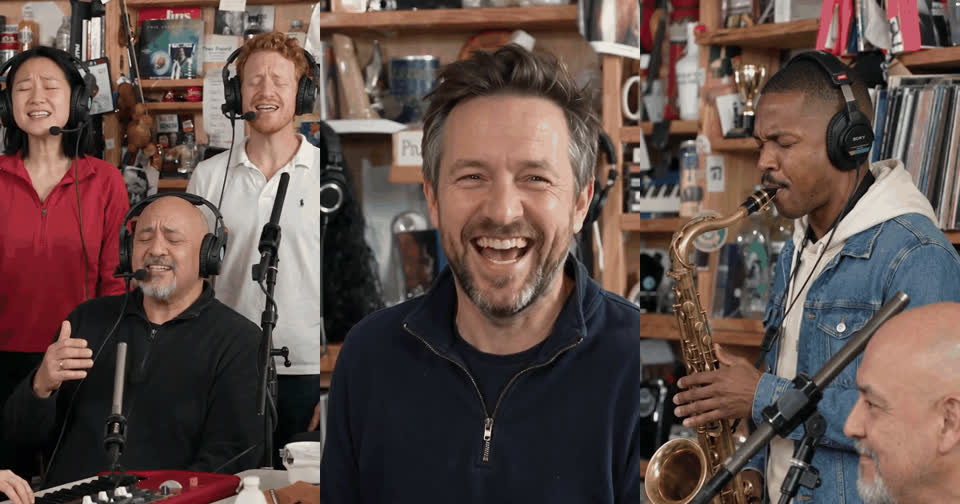
A 15-second vertical 9:16 MP4 with no watermark: the band behind the desk, your long note, laugh and wave, then the sax solo, cut where the meme cuts. Everyone keeps their own face, hair and clothes. You can close the page while it's made; it waits under My videos.
Making it: questions
Do I need to know how to edit videos?
No. The shots, the cuts and the sound are already in place. You add photos and download the finished video.
Can I make the Tiny Desk AI video on my phone?
Yes. It runs in your phone's browser, with no app to install.
Do I need a prompt or a CapCut template?
No. There is nothing to write and no template to download.
Can ChatGPT make the Tiny Desk AI video?
No. ChatGPT can describe the trend, but it doesn't make this video from your photos. You need a video generator for that.
Start with your photo and a free preview.
Make my video